
Try These 10 Finch Alternatives If Finch Starts to Feel Like a Second Job

The Finch: Self-Care Pet has a simple yet ingenious idea behind it: take care of yourself and see the progress in your digital pet. Gamified approaches are gold because they often highlight the little progress you'd otherwise overlook.
Finch has already gathered 9 million daily users, but does that mean it's the best just because it's used the most?
If you were interested in self-care or daily tracking, but the Finch app just isn't for you, we present 10 apps like Finch but with different concepts. Everyone will find something to their particular liking.
Top 10 Finch Alternatives
In short, the top 10 best Finch alternatives are:
Breeze: Self-Discovery Buddy—diverse self-care that focuses on self-awareness.
Habit Tracker: Ripples—strict tracking for life optimization.
Things 3—project-management-like approach to habit tracking.
Habitica—turn your life into a game, even if you struggle with motivation.
Pixa: My Year in Pixels—quick tracking for a quick visual overview.
Blossom: Habit Tracker—self-compassionate habit-tracking with a soft aesthetic.
Owaves: My BodyClock—life visualization in a 360-circle and time tracking.
75 Days Challenge—strict discipline-building that allows no mistakes.
Tiimo: Daily To Do List—neurodivergent-friendly routine planner.
ADHD Organizer: Llama Life—task planner to deal with procrastination (not just for ADHD).
Consistent self-care is built when your tools correspond to your personal energy and lifestyle. While gamified pet care, like in Finch, may suit some individuals, others may thrive in different ways.
Try the app that sounds most appealing to you. Don't hesitate to experiment, fail, and try again. That's how you find an actually effective tool.
1. Breeze Self-Discovery
Rating: 4.7/5.
Price: Free download with optional premium subscription.
What to be aware of: The platform centers on short micro-habits rather than deep clinical therapy.
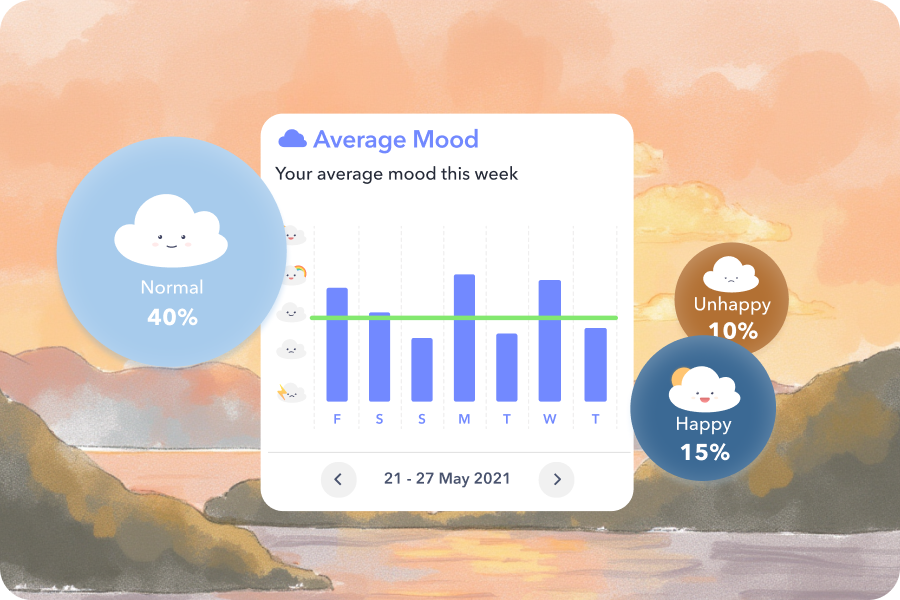
Breeze: Self-Discovery Buddy supports daily mental wellness by combining quizzes, journaling, routines, and psychoeducation into a cohesive daily practice.
This app also uses a gamified approach, like Finch, but the gamification here centers on your routine, rather than a digital pet. In the Breeze app, the more daily tasks and self-care activities you complete, the more badges you receive. You unlock achievements, set new goals, and grow in a self-discovery journey.
Breeze Self-Discovery has the following features:
45+ quizzes about mental health and personality.
Journaling for gratitude, anxiety, and daily reflection.
Routines for daily planning and tracking.
Mood tracking with detailed analytics.
Psychoeducation & Reddit-like discussion in communities.
Customization.
Relaxing games & breathing exercises.
Affirmations.
The best part? These are only free features. The diversity of instruments makes Breeze a great entry point for exploring new self-care tools if you have just decided to switch from Finch.
2. Habit Tracker: Ripples
Rating: 4.8/5.
Price: Free download with a monthly premium, starting from $3.
What to be careful about: A strict focus on life/habits optimization rather than self-care, which sometimes needs to be flexible.
Ripples is a habit tracker that focuses on visualizing your self-care. In this app, you keep a log of habits in various color-coded domains of your life—work, exercise, finances, relationships, etc.—and track habits here. Here's how it works:
Each habit is a separate window with pixels.
Each pixel represents a day when you do/skip a habit.
You see habits side by side and compare which areas of your life need attention.
The app also offers one of the most detailed analytics on the market, summarizing your progress and pointing out where your life can be optimized further.
3. Things 3
Rating: 4.8/5.
Price: $9.99 one-time upfront purchase for iPhone.
What to be careful about: It relies entirely on personal self-discipline. Users complain that getting into the app is challenging, and onboarding doesn't really help out.
Things 3 is the first paid app on this list and one of the most trusted and transparent on the market.
Things 3 allows you:
Create to-do lists and checklists.
Group your notes into projects.
Integrate with other effectiveness tools, like calendars.
Add widgets.
Search notes effectively.
Why use Things 3 instead of your regular checklists? It's much easier to manage your tasks in this app. It's built to be intuitive and minimalistic. That's why this app is also frequently chosen for work and has won the Apple Design award.
4. Habitica
Rating: 4.8/5.
Price: Free download with optional features starting at $5.
What to be careful about: The app has a penalty mechanic (miss a day = receive a punishment), which can be discouraging for certain users.
In terms of gamification, Habitica is the closest to the Finch app. Habitica's approach is to turn your daily routine into a retro 8-bit Role-Playing Game (RPG).
The benefit of such an approach is that your everyday chores and habits aren't as boring. For completing things from your to-do list, you earn XP (experience points), gold, and health. By collecting it, you also collect gear and join multiplayer party quests to battle monsters.
Such an approach will work for those who struggle to find motivation for daily tasks with a delayed reward. For example, when you first start going to the gym, you won't notice results until the first two months. However, the Habitica app lets you see progress even after the first visit.
5. Pixa: My Year in Pixels
Rating: 4.6/5.
Price: Free download with a monthly subscription starting at $2.
What to be careful about: Many users complain about maintenance burnout tied to the app's core principle—bullet journaling.
Pixa is a self-tracking habit for literally everything. It's based on principles of bullet journaling, basically, yes/no journaling.
The Pixa app works as follows:
Each day of the year is a box on a grid.
You select what exactly you want to track: habits, mood, medications, work, productivity, gratitude, etc.
Every day, you log in your notes.
After some time, you get a color-coded grid with the main info about your month/year.
This form of journaling is universal and also an easier entry point for people unfamiliar with self-tracking.
6. Blossom Habit Tracker
Rating: 4.9/5.
Price: Free download with optional tips from $3.
What to be careful about: Since it's a recently built app, it's still full of bugs. Good news, the developer reacts to them pretty quickly.
Blossom Habit Tracker has been developed by TikTok influencer Frances Fling, who wasn't satisfied with other habit trackers on the market.
She built an app with a simple interface, focused solely on habit tracking and an overview of consistency. Here, you set a habit, its frequency, and reminders. Then, you track. For each trackable habit, you'll have a streak and monthly and yearly completion overviews.
It's simple, but it has a different kind of soft interface that encourages users to be kinder to themselves rather than constantly optimizing.

7. Owaves: My BodyClock
Rating: 4.6/5.
Price: Free download; premium costs $13 per month.
What to be careful about: The app is only available for iOS.
Owaves is a self-care and productivity app rooted in different time management techniques, primarily through visualization:
In the app, you have a 24-hour clock that displays your day.
You divide your daily tasks into eight color-coded categories: Eat, Move, Work, Relax, Sleep, Flow, and Play.
You plan your day.
You get analytics of how much of your days you spend on each category.
Unlike traditional productivity apps that focus mainly on maximizing output, Owaves emphasizes balance across different categories.
8. 75 Days Challenge
Rating: 4.4/5.
Price: $5 after downloading the app.
What to be careful about: The app is extremely rigorous and doesn't forgive mistakes, which can be discouraging.
The 75 Days Challenge app is based on the "75 hard challenge," a toughness challenge, during which a person has to spend 75 days maintaining:
Daily exercise
Healthy nutrition
Staying hydrated
Reading (or other activity that stimulates cognitive thinking)
Hence, the app offers to track habits in the same domain. Users can set their own habits, but the main concept is to last 75 days with no skips or excuses.
By tracking non-negotiable daily commitments, the app helps rebuild self-worth and a sense of agency through concrete evidence of consistency. When users complete the 75-day challenge, they feel more empowered and confident that they can deal with anything that comes their way.
9. Tiimo: Daily To-Do List
Rating: 4.6/5.
Price: Free download with a monthly subscription starting at $7, depending on location.
What to be careful about: The same features marketed as neurodivergent can be found in other apps for free.
Tiimo is a visual daily planner designed specifically to support neurodivergent individuals struggling with executive dysfunction, difficulties with planning, organizing, and initiating.
The Tiimo app summarizes all the popular strategies against executive dysfunction in one app:
Organizing daily tasks in one place.
Setting reminders.
Using timers.
Braindumping ideas/tasks into AI that will offer an optimized way to know when and how to complete tasks.
But the best thing about Tiimo is earning rewards for completing tasks, which increases motivation and engagement for someone with ADHD or autism spectrum disorder.
10. ADHD Organizer: Llama Life
Rating: 4.5/5.
Price: Free download with optional premium, starting at $6.
What to be careful about: The app is built specifically for active task execution and work focus, meaning it lacks long-term mood tracking, guided journaling, or emotional analytics.
Llama Life is another self-tracking app built specifically for neurodivergent adults who procrastinate because of initiation paralysis. However, the features will be helpful for anyone who wants to get rid of procrastination:
Set the timer.
Set the start timer (how much time you'll wait before starting a task).
Organize your tasks by life domain/project.
See an overview of how much time you expected a task to take vs. how much it really took.
This app works on numerous levels: audio, visual, and color to help users stay on a task without losing attention.

Why Should I Search for Finch Alternatives?
While Finch was one of the first in gamified self-care, a number of dedicated users are already searching for alternatives. Why?
These reasons why you should switch to Finch alternatives are collected from the user reviews and Reddit discussions:
App restructuring that changed the main features. Recently, the "Journeys" in the Finch app were replaced with Self-Care Activities (SCAs). Firstly, it removed the progress of many users. Secondly, these features proved unreasonably complex, to the point that they became unusable for some users.
Negative emotions connected to the app's concept. The playful motivation to take care of your pet starts to pressure some users. Maintaining a virtual pet actually became another demanding task to stress about, which triggers even more guilt, avoidance, and lack of motivation than before using the Finch app.
Questionable monetization approaches. Users express growing dissatisfaction with strict paywalls and restricted features for free-tier members. There's nothing wrong with monetizing the work of the whole team, but the way the company does it, obnoxiously, not leaving a choice, starts to frustrate more and more users.
Self-care tools should simplify your day and lower emotional stress, not create additional obligations. If your current habit tracker leaves you feeling anxious, guilty, or exhausted, it's essential that you take a break or switch to something that would encourage self-care in a flexible, self-compassionate way.

How to Choose a Habit Tracker for You?
Finding the ideal habit tracker depends on your specific psychological needs, daily routine, and personal motivation style. Don't force yourself into a system that will become another task. Better select an app that directly addresses your primary need:
Struggling with burnout, emotional exhaustion, or blank-page anxiety? Choose Breeze Self-Discovery.
Dealing with ADHD, executive dysfunction, or procrastination? Opt for Tiimo or Llama Life.
Motivated by gaming mechanics and group accountability? Go for Habitica.
Craving visual aesthetic tracking? Pick Pixa or Blossom.
Needing clean, distraction-free task management? Try Things 3 or Ripples.
Seeking a strict physical and mental reset? Go with the 75 Days Challenge.
Looking to align routines with your biological clock? Choose Owaves.